Step 1:
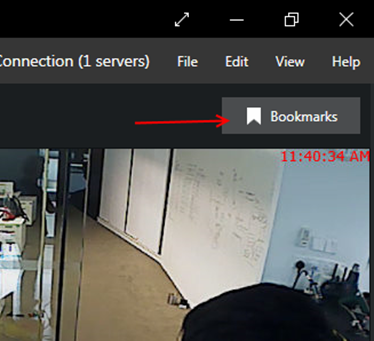
1. Select Playback tab, click the Bookmark button to opens up an additional panel that allows you to browse the existing bookmarks.
Step 2:
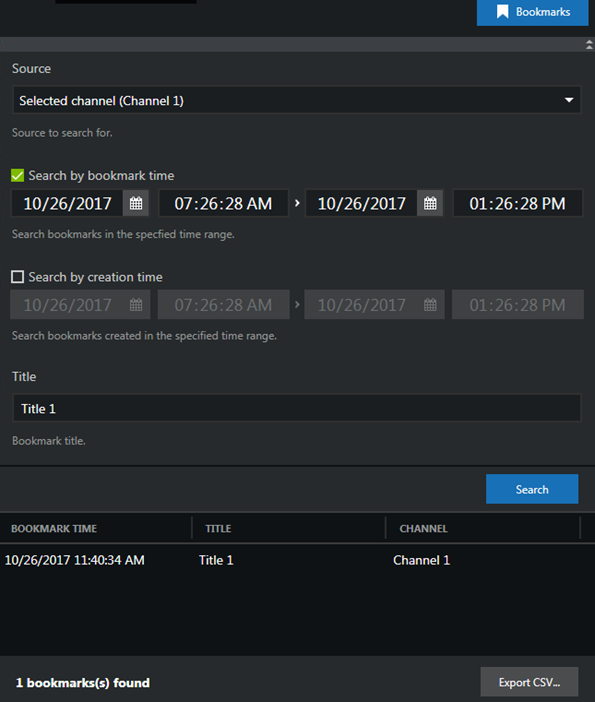
1. Select the Source (Selected channel or All visible in layout).
Step 3:
1. Select Search by bookmark time (its position within the timeline) and/or Search by creation time (when the bookmark was added, regardless of its location on the timeline).
Step 4:
1. Optionally, enter a bookmark title or a part of it to refine your search results. Click the Search button.
Step 5:
1. Click the bookmark result and press the Play button to start the playback.
Was this article helpful?
That’s Great!
Thank you for your feedback
Sorry! We couldn't be helpful
Thank you for your feedback
Feedback sent
We appreciate your effort and will try to fix the article