Front Panel
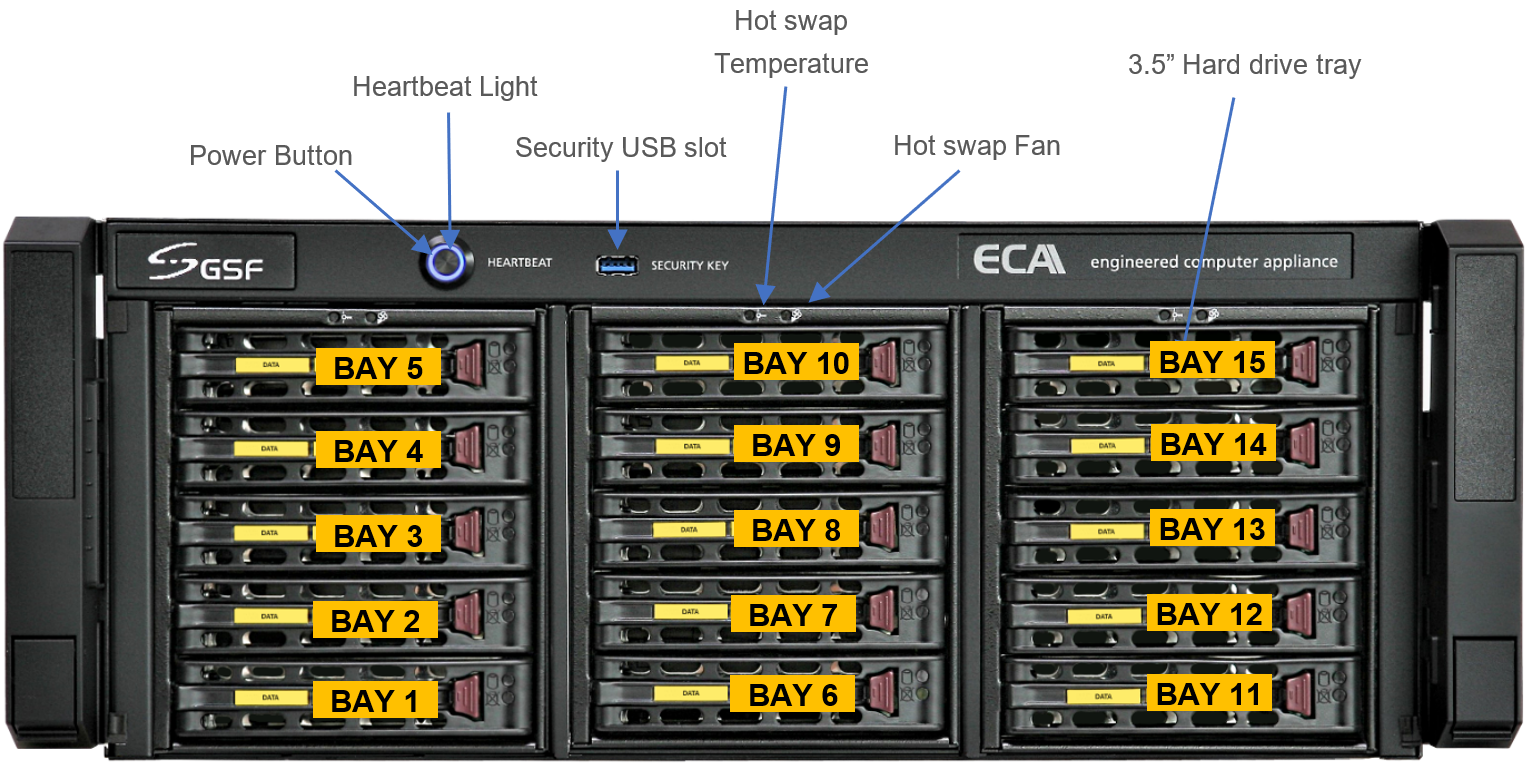
| Power Button | Press to power-up the ECA. |
| HeartBeat Light | LED indicator which also display the status of ECA operation state. |
| Security USB slot | Ports for ECA Security Key (USB type) which is used for authentication purpose to access ecaOS Dashboard. |
| Hot-Swap Temperature | Ports for ECA Security Key (USB type) which is used for authentication purpose to access ecaOS Dashboard. |
| Hot Swap Fan | The LED will light up if no hot swap fan detected or not functioning |
| Bay 1 - Bay 15 | hard Disk Drive Bay 1 to bay 15. Total 15 bays for FX model. |
Rear Panel
Was this article helpful?
That’s Great!
Thank you for your feedback
Sorry! We couldn't be helpful
Thank you for your feedback
Feedback sent
We appreciate your effort and will try to fix the article